 DONNOK
Customize a money widget on iPhone or Android without changing the app theme
Keep FLIP in the app and choose a different DONNOK widget theme. Explore decimals, cumulative change and calculation time, plus iPhone and Android display differences.
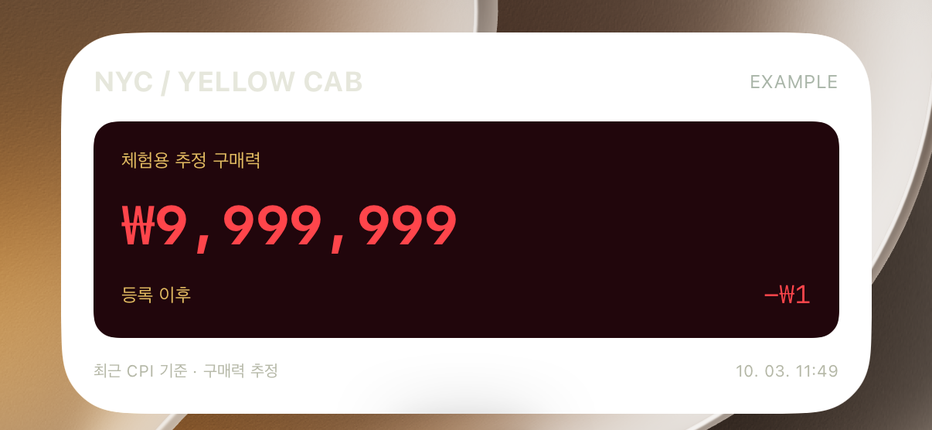
Can you change only the widget theme?
Yes. Open Widgets in the app settings and select a theme. Same as app follows the app’s theme. Select and save a specific theme to keep that choice even when you later change the app theme.
This preference applies to all DONNOK widgets together. It does not let each widget instance use its own theme. The screenshot above shows one iPhone widget example, not an Android screen.
Three combinations for your home screen
These are settings you can combine, not extra preset buttons in the app. Confirm the theme with Save; decimals and the two display switches save when changed. The operating system controls when the widget reflects the changes.
| Desired look | Theme and decimals | Change and calculation time |
|---|---|---|
| Match the app | Same as app · currency default | Both on |
| Simple numbers | MINIMAL · none | Change off · calculation time on |
| Strong color contrast | NYC · 2 places | Both on |
What do the decimals and small labels mean?
Choose Currency default, None or 2 places. Two decimals show small differences; no decimals keep the figure simpler. This changes formatting, not your registered principal or the calculation model.
Cumulative change is the difference between estimated purchasing power and total registered principal. Calculation time is the reference time for the value, not necessarily when the phone last rendered the widget. Hiding it does not make the value newer; keeping it on helps you interpret the figure.
Does the iPhone Lock Screen use the same colors?
On iPhone, home screen widgets have small and medium sizes, while supported Lock Screen widgets use rectangular and inline formats. The Lock Screen uses system monochrome rendering, so it does not reproduce the home screen theme’s full colors and background.
Android offers home screen widgets. Adding, resizing and available space depend on the manufacturer and launcher. Small widgets may abbreviate amounts or omit details. The iPhone and Android guides below explain installation separately.
Is it normal for the widget not to move continuously?
Yes. Widgets do not animate continuously like the app’s board. Updates follow the operating system’s schedule, so a saved setting is not guaranteed to appear immediately or refresh every second.
The amount is the estimated purchasing power of registered funds in the selected currency. You cannot select one individual fund or an investment scenario’s return for this widget. The model uses Korean CPI regardless of currency and does not fetch a bank balance.
Give the widget its own look today
Keep your favorite app theme and fix the widget to MINIMAL or NYC. Leave Calculation time on, then check whether the digits work with your wallpaper. The amount is visible on the home screen, so consider who can see it. Widgets have no amount-hiding setting.