 DONNOK
How is DONNOK different from budgeting and account-linking apps?
Budgeting apps track spending and account aggregators show balances. DONNOK shows the estimated purchasing power of money you record. How the three compare and how to use them together.
What does each type of money app show?
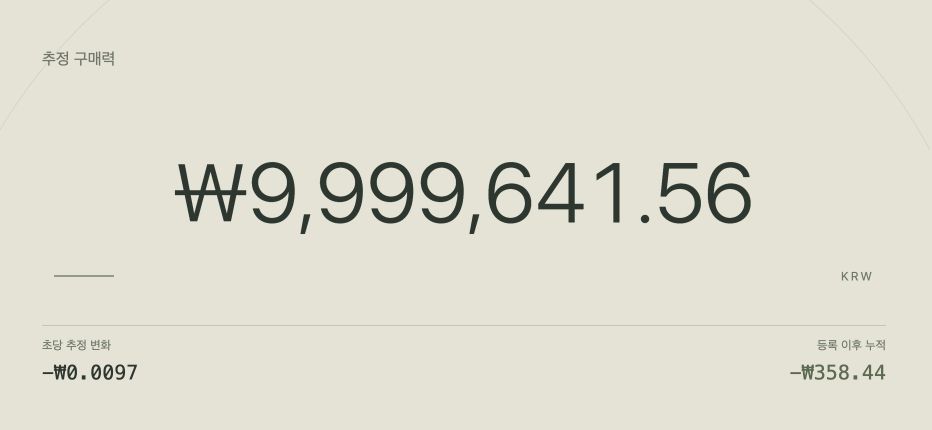
The big number means something different in each app. In a budgeting app it is what you spent and what is left in your budget, in an account-linking app it is the balance fetched from your bank, and in DONNOK it is the estimated purchasing power of money you recorded.
The budgeting and account-linking columns below describe typical features and vary by app. The DONNOK column reflects the released app, version 0.1.1.
| Feature | Budgeting app | Account-linking money app | DONNOK |
|---|---|---|---|
| Main number | Income, spending and budget | Balances and transactions of linked accounts and cards | Estimated purchasing power of recorded money |
| How data gets in | Typed in, or imported from card or bank records | Fetched automatically after linking institutions | You enter an amount and a registration date |
| Sign-up and linking | Varies by app | Often requires an account and bank authentication | No sign-up, no bank link |
| When the number changes | When you record a new transaction | When the real balance or market price changes | As the CPI-based estimate is calculated over time |
| Question it answers best | Where did my money go this month? | How much do I have in total right now? | How is this money’s value changing over time? |
What does the number on the DONNOK display mean?
The large figure is estimated purchasing power: the amount you entered, multiplied by the price index on its registration date and divided by the current price index. For example, 10 million won recorded in August 2025 is worth about 9.70 million won in purchasing power using South Korea’s monthly CPI (116.45, then 120.05 in August 2026).
A falling number does not mean money is leaving your account. The per-second estimated change and the change since registration shown below the main figure spread the effect of rising prices over time; they are not transactions or balance changes.
Who is DONNOK for, and who is it not for?
DONNOK suits people who keep money aside for a while, such as emergency savings, savings principal or a rental deposit; people who want to see how inflation affects their own money in concrete numbers; and people who enjoy a retro number display on a desk or Home screen.
It will not help with spending categories, budget alerts, card statements or adding up balances across accounts automatically. It never fetches balances, so you update amounts yourself when they change, and it does not recommend investment products.
How can I use DONNOK alongside a budgeting app?
Give each app its own job. Track daily spending in your budgeting app and record only the money you plan to keep for a while in DONNOK.
- In your budgeting or banking app, check which money you will not touch for a while: emergency savings, savings principal, a deposit and so on.
- In DONNOK’s My funds tab, choose a category and enter the amount and the date you set that money aside (or today) as the registration date.
- In the Display tab, pick a theme you enjoy watching and add a Home screen widget if you like.
- When the real amount changes a lot, edit the fund or add the change as a separate fund.
Is DONNOK free, and do I need an account?
DONNOK is a free download for iPhone, iPad and Android on the App Store and Google Play, and it works without an account. It may show banner ads; removing ads is a one-time in-app purchase, and the actual price appears on the store’s purchase screen.
Fund data is stored only in your device’s secure storage and is never sent to a server. If you are new to the app, the getting-started guide walks you through adding your first fund.