 DONNOK
Tired of daily expense tracking? A lighter way to observe saved money
Try DONNOK with a sample amount, then record one fund. Use a retro money display or home screen widget to observe estimated purchasing power without a daily expense diary.
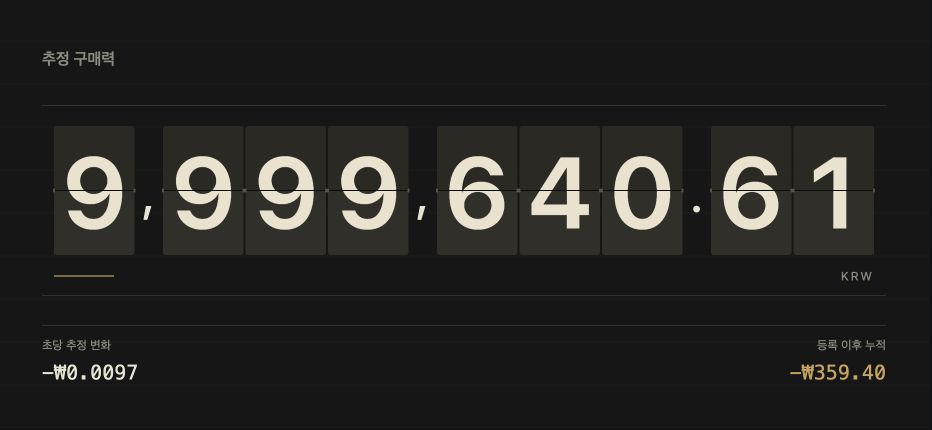
Can you start without keeping a daily expense diary?
If missing a few coffee purchases makes you abandon your records, try a smaller task: choose money you have already set aside, such as an emergency fund, and observe what it can buy over time. You do not need to reconstruct every purchase to use DONNOK.
Finding spending categories to cut still requires transaction records. DONNOK focuses on money you keep; it does not categorize expenses or connect automatically to bank accounts.
1. Explore the display before entering your own amount
Before your first fund, a sample amount lets you explore eight themes. Compare the split digits of FLIP with the warm orange glow of NIXIE and choose a screen you would enjoy opening again. The amount in this screenshot is also an example, not a user’s assets.
Recording your first fund ends sample mode. The sample is never added to your funds. If you are curious about the moving digits, explore them before entering your own amount.
2. Record one fund and its reference date
For a practice example, imagine an existing emergency fund of KRW 500,000. Choose KRW in the app and manually enter that amount and its reference date. Avoid entering the same money under several funds.
Recording creates an entry; it does not transfer money or start automatic saving. Check and edit the entry when the real amount changes. The getting-started guide below explains registration in detail.
3. Pick a short check-in that fits your day
You do not need to keep the app open. Choose one situation from these examples. They combine existing features rather than promise a particular saving outcome.
| Situation | Try this | What to check |
|---|---|---|
| Sitting at your desk | Open the FLIP display | Principal versus estimated purchasing power |
| Looking at your home screen | Add a DONNOK widget | Calculation time and cumulative change |
| Your saved amount changes | Review and edit your fund | Real amount and duplicate entries |
Do moving digits mean money is leaving your account?
No. The display estimates purchasing power using Korean consumer price index (CPI) data. Moving decimals express a time-based calculation, not a new price survey every second or deductions from an account.
Selecting USD or JPY does not switch the model to US or Japanese inflation. The estimate also differs from your personal spending mix and actual bank balance. Read the methodology below alongside the display.
Start by choosing a screen you like
If daily expense logging feels demanding, open the sample display and pick a theme first. When you are ready, record just one fund. DONNOK is available for iPhone, iPad and Android; the app interface supports Korean and English.